This article was created as part of the Agentic Azure Insights community initiative Berg Digital contributes into. When building a RAG system, one must take into account risk of hallucinations. In this article I will share my experience identifying sources of hallucinations and provide proven hardening strategies that help to identify and mitigate risk of hallucinations in RAG application developed with Azure stack (OpenAI, AI Search, Document Intelligence as key components). Text aims two audiences: those who build their first RAG system, and also those who operate a RAG system that sometimes gives wrong answers. This article includes AI-generated images.
What is RAG?
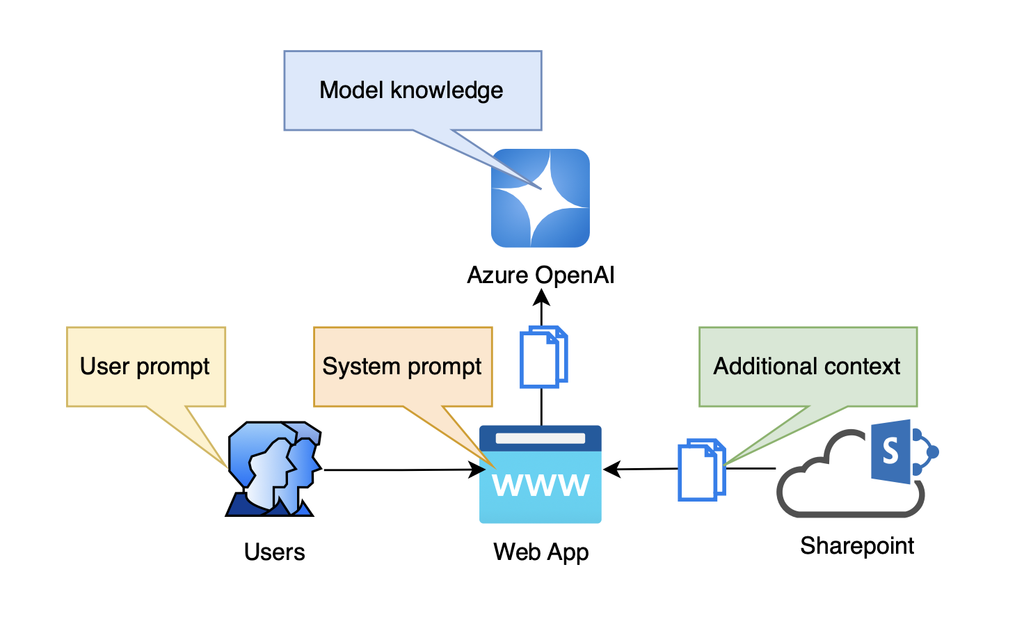
RAG means Retrieval-Augmented Generation. It is an approach to build AI-chatbots and Conversational assistants. A user sends a question – the system finds related data in corporate resources (for example in SharePoint) that are not available for Google search and public AI-assistants like ChatGPT or Claude. Then RAG application sends the users’ question, a system prompt and this retrieved data to a Large Language Model (LLM). The LLM writes the answer, expanding it, when necessary, with its own model knowledge, and returns the answer to the user, referencing documents used to create it.
What is a hallucination?
A hallucination is a response from RAG application that looks correct, but is not true. The LLM does not say “I do not know”: instead, it gives some wrong answer with high confidence. Modern LLMs process text, images and sound. This makes hallucinations more difficult to find.
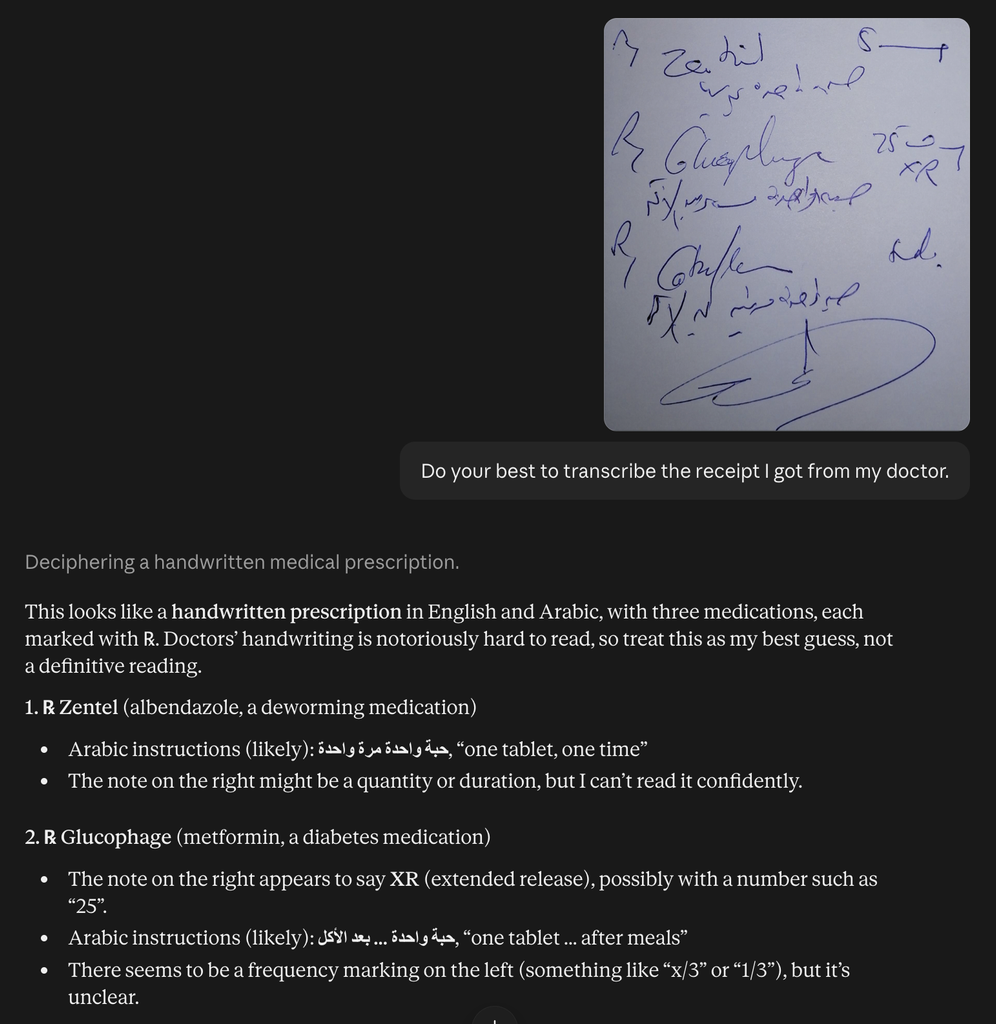
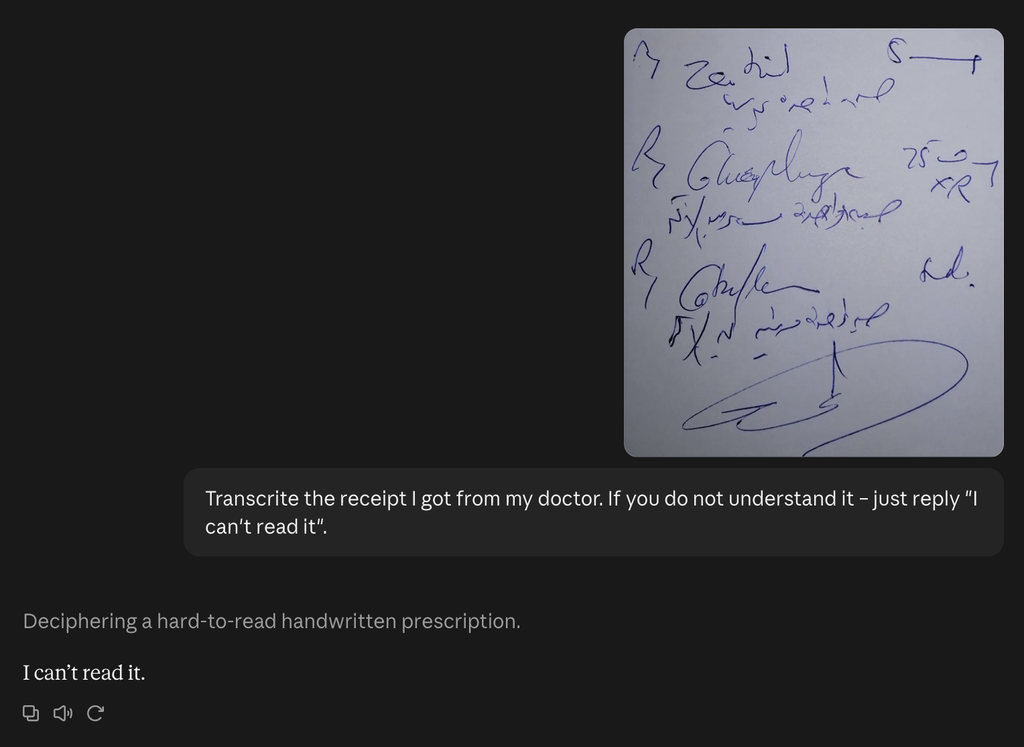
Look at the handwritten medical prescription below. Copy it to AI-assistant and ask: “What is written here?” Every LLM gives an answer, but you cannot know if the answer is correct.
The answer you receive is one type of a hallucination, caused by poor quality of input document and your request to interpret it by all means. Try to upload same image to different AI-assistants (ChatGPT, Claude.ai, Gemini, etc.) and compare results : they will be different. Now allow LLM to admit it does not understand the text clearly and ask it to reply “I cannot read this” in such case. Congrats: you just successfully combated this type of hallucinations!
Why this is dangerous in RAG. Users expect higher accuracy from RAG than from a regular AI-Chatbot. Thus, they trust the answer and act on it. Multi-modal RAG takes text, images, audio or video as input, and gives them as output. This makes the risk larger. Some examples:
- A helpdesk agent reads a screenshot of an error message and suggests a wrong fix. The user applies it, and the situations becomes even worse, causing costly to correct.
- An agent suggests images from a corporate image bank for a blog post. A wrong image confuses thousands of customers, creating brand damage.
- In a bank or an insurance company, a wrong answer can break regulations and cause incompliance and regulatory fine.
Hallucinations are also difficult to find and fix, because GenAI is not deterministic and the solution has many components. Hallucinations waste time, increase costs and decrease trust in GenAI solutions in general.
Where the problem starts
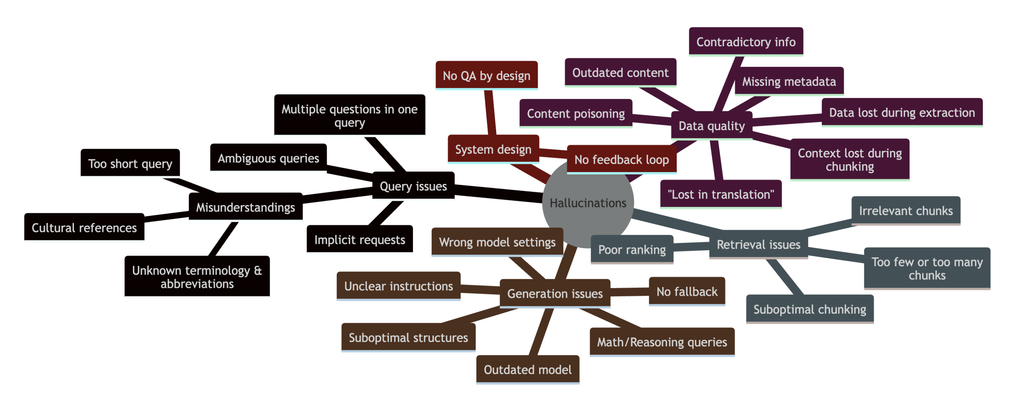
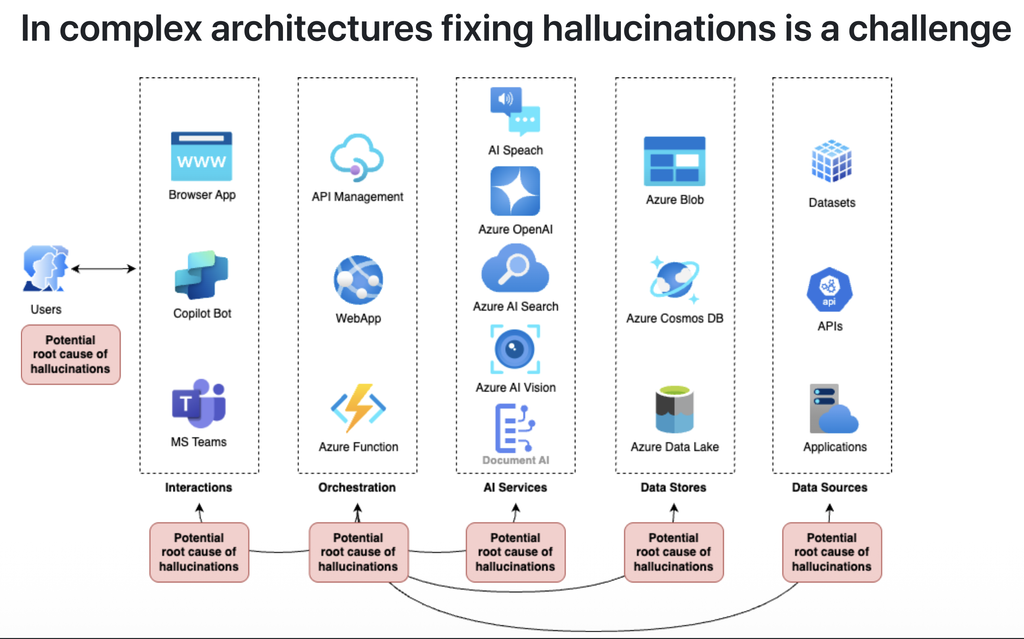
In RAG application the exact root cause of hallucination may sit anywhere in the stack: it can be poor quality of input document (like in the example above), or misinterpretation of user’s request by LLM, or sloppy business logic such as document retrieval and ranking, and even security issues as access rights or data poisoning. A RAG system in Azure has five layers. Each layer, and also the users, can cause a hallucination. Table below summarizes most frequent issues.
| RAG layer | Azure services involved | How it causes hallucinations |
|---|---|---|
| End-user interactions | Web app, Copilot Studio agent, Microsoft Teams | Loses the chat history. Short or ambiguous user query passed further, many questions in one query, implicit requests, company-specific terms and abbreviation passed without expansion or explanation. No feedback loop. |
| Orchestration | API Management, App Service, Azure Functions, Foundry Agent Service | Uses a wrong prompt or builds incomplete context. Does not stop on errors. Blindly passes LLM output. Data extraction loses critical details such as tables or checkboxes. |
| AI services | Foundry Models (Azure OpenAI), Azure AI Search with Foundry IQ, Content Understanding, AI Speech, AI Content Safety, | Search returns wrong chunks. The LLM fills gaps with invented facts. LLM relies on internal knowledge more than on retrieved documents. Bad chunking, irrelevant chunks, too few or too many chunks, poor ranking. Wrong reasoning settings, suboptimal (too small) models used. |
| Data stores | Blob Storage, Cosmos DB, Data Lake, OneLake | Keeps old versions and duplicates. The index is not up to date. User has no access rights to read from data store. Outdated or contradictory content, missing metadata, data lost in extraction or chunking, translation errors, content poisoning. |
| Data sources | Datasets, APIs, 3rd-party applications | Files skipped because their format is not supported or size is too large for processing. No quality assurance. |
Hardening retrieval
A RAG system uses two different AI-models:
- The embedding model reads your documents and the user question. It changes their meaning into numbers. The search then finds the documents with the most similar meaning.
- The generation model reads and interprets user prompt and the documents that the search found provided as its context to write the answer. The LLM can use only what the search finds. Thus, the embedding model decides what your system understands and how. If it finds the wrong documents, the LLM writes a wrong answer with high confidence.
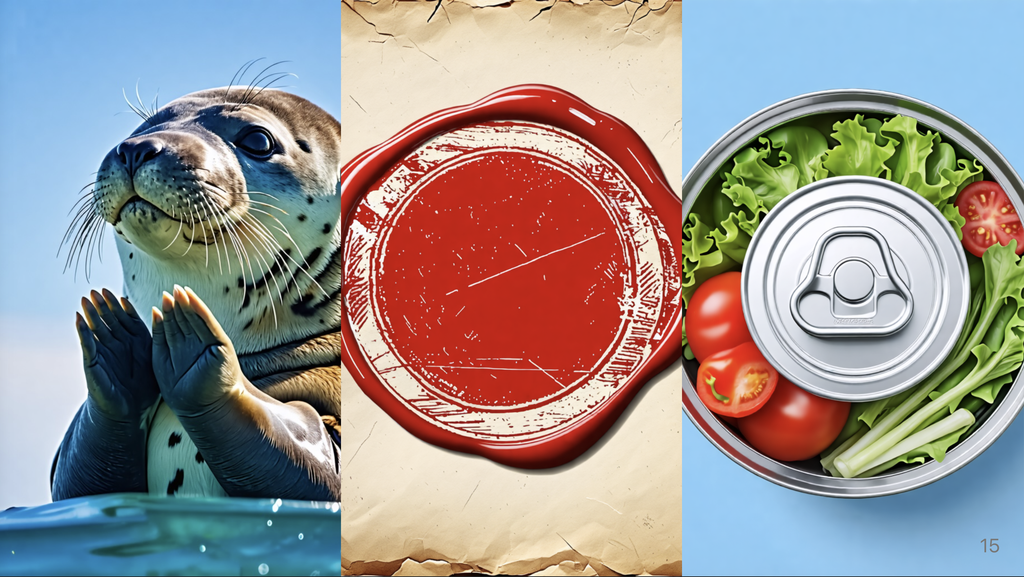
Let’s discuss it on example of a Synonym problem (one word, many meanings): All three images below show a “seal”: an animal, a wax seal and a seal on a can. A query “How our seal looks like?” can be misinterpreted, depending on the context of the question, organization type, and even role of the user. In a zoo, “seal” means the animal. In a law office, it means a wax seal or a stamp. In a food company, it means a closed can. A general embedding model does not know your business and cannot explain what “seal” means for the specific user, resulting in the wrong response returned by the LLM.
To prevent hallucinations, select an embedding model that fits your languages, your domain and your media. Test it with real questions from your users. Microsoft Foundry has these options:
| Need | Models in Microsoft Foundry |
|---|---|
| Text in many languages | text-embedding-3-large (most advanced) and text-embedding-3-small, Cohere Embed v4, Cohere Embed v3 multilingual, ada-002 (cheapest and smallest one). |
| Images and text | Azure AI Vision multimodal embeddings |
| Special domain, for example law, insurance or medicine | Domain models from the Hugging Face collection, or your own fine-tuned model, on managed compute |
| Audio | Open models such as CLAP, hosted as a custom model |
A good embedding model alone is not sufficient. In Azure AI Search, use these functions together:
- Hybrid search: keyword search and vector search in one query.
- Semantic ranker: a second model sorts the results again.
- Filters: use metadata, for example category = “animals”.
- Agentic retrieval (Foundry IQ): an LLM plans the search, runs subqueries and gives citations. It is slower and uses more tokens. Use it for complex questions.
Hardening text content
If the data in the index is wrong, the answer is also wrong.
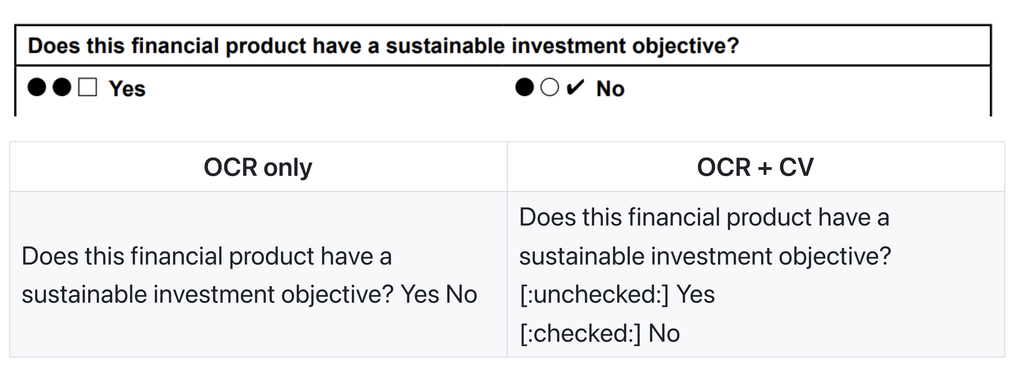
Read checkboxes correctly: Plain OCR has difficulties understanding complex layout only text. Particularly, it extracts “Yes” and “No” options from forms, but loses the checkbox state. Then the LLM must guess – causing hallucinations.
The layout analyzers in Document Intelligence and Content Understanding detect selection marks. Content Understanding writes them into Markdown as ☒ (selected) and ☐ (unselected):
Add metadata to tables: A large table that spans over several pages loses its structure when you split it into chunks. The LLM cannot see which “X” belongs to which column. Convert each table into two parts:
- Let LLM to write a short summary for the whole table: “This table is a risk matrix for investment funds. Each row is a fund. The columns are risk types.”
- Store rows as JSON, transforming content into keywords or key=value pairs:
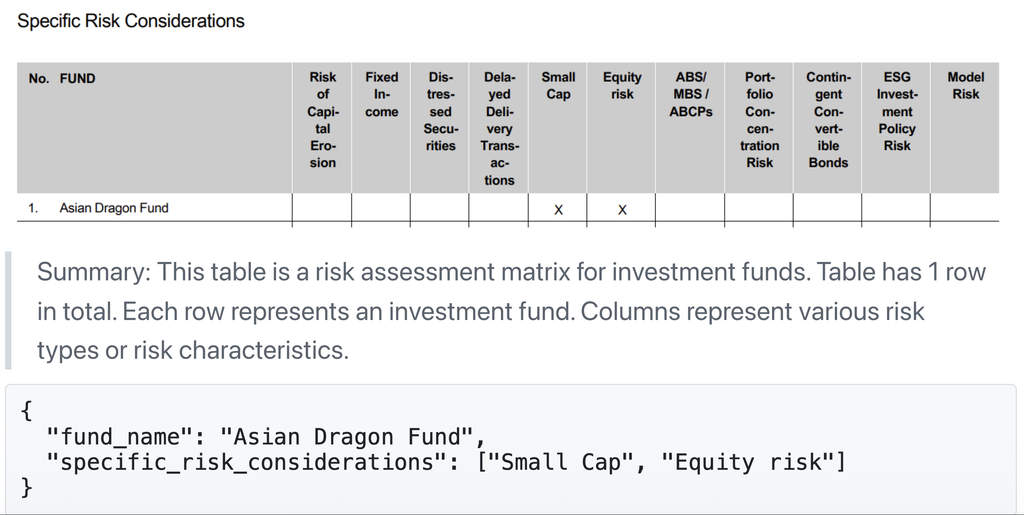
Content Understanding can extract these fields with a schema that you define. Its RAG analyzers keep tables and sections together.
Explain corporate vocabulary: The LLM learned most words from public English text. It does not know acronyms, abbreviations and domain terms used in your organization. Explain all of them in the system prompt.
Example: in German-speaking insurance companies use “VP” to communicate “Versicherte Person” (insured person). It does not mean “Vice President”. Without this key understanding, LLM will answer to the question “Wie viele VP bedienen wir insgesamt?” (“How many VPs do we serve in total?”) with count of Vice-Presidents, not insured persons – the difference can be huge.
Every company has its own vocabulary. Create a glossary, test it and add it to the RAG context before you use the system.
Block content poisoning: Any document uploaded by malicious user outside of secure perimeter can contain hidden instructions (we call it “prompt injection“) for the LLM to confuse it and change the way it responds. Use Prompt Shields for documents (feature of Azure AI Content Safety) to find these attacks before you send the chunks to the LLM.
Hardening images and audio content
For audio, a raw transcript is not sufficient to build high quality RAG, because raw text often does not contain “diarization” – metadata about speaker names and roles, so it is not always clear who said what. Raw transcripts also omit sounds – such as emotions of audience (clapping, crying) , sounds performed by other actors (door opens and closes, cat meows, birds singing). Content Understanding (prebuilt-audioSearch) gives a transcript with speakers and times. For sound events, use an audio model such as YAMNet or CLAP that lets you find sounds with a text query.
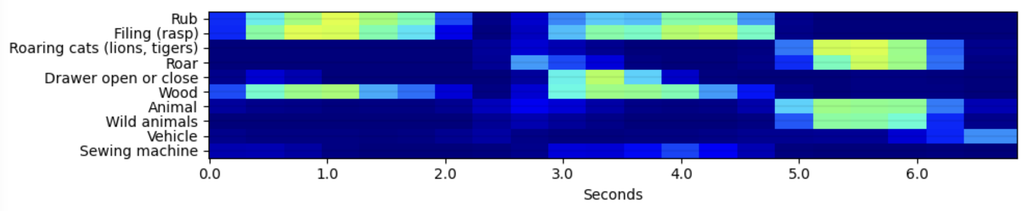
For images, put the text query and the images into the same vector space, using multi-modal embedding model. Good strategy is also give a short description of each image. Content Understanding (prebuilt-imageSearch) can do this for you, as well as many advanced LLMs.

Hardening output generation
Less is more: In 2026, many models accept up to 1 million tokens as context. That is more than 1,000 pages of text. It looks easy to put all company documents into one prompt and skip retrieval. Do not do this: You pay for every token in every question, and a long prompt is slow. Also quality suffers: When answer needs many facts scattered across long context, or reasoning based on contradicting facts, answers become worse. LLM often finds some of the facts, but not all of them. As models are very different and evolve quickly, best way is to test on your tasks.
Do not send everything. Best approach is to limit the context, improving retrieval, filtering and ranking. Send only the chunks that the LLM needs. Remove duplicate and outdated chunks. Use hybrid search and agentic retrieval for questions that need many facts.
Tell the LLM to cite the source of each fact. This also makes the answers more accurate. However, do not ask the same LLM in the same turn to checks its own work: models are known to be overconfident and can make the same mistake again.
Azure has few good tools to consider:
- Groundedness detection (Azure AI Content Safety): a separate model compares the answer with your sources and marks ungrounded text. A correction option can rewrite it. Limits: English only, some regions only.
- Foundry evaluators: Groundedness, Relevance, Retrieval and Document Retrieval. Use them before each release and on samples of real traffic.
- Citations: Foundry IQ knowledge bases return sources. Show them, so users can verify the answer.
- Block answers from model knowledge: In Copilot Studio, turn off Allow ungrounded responses. In Foundry Agent Service, set
tool_choicetorequiredand tell the agent to answer “I don’t know” when the knowledge base has no answer.
If the answer is not grounded, do not show it. Escalate every unanswered question to a person so you can improve your RAG.
Takeaway: Checklist for your RAG system
- Look for the root cause in all layers, not only in the LLM. Switching to more powerful and most recent model does not solve all of your issues.
- Use Azure AI tools like hybrid search, the semantic ranker and agentic retrieval.
- Use the largest embedding model that fits your media.
- Extract forms and tables with Content Understanding.
- Scan documents uploaded by untrusted users with Prompt Shields.
- Send only the most relevant chunks, not whole body of knowledge.
- Check answers with groundedness detection.
- Run Foundry evaluations and collect user feedback.
- Allow LLM to simply respond “I do now know it” to any user query as a fallback.
Remember: You cannot remove all hallucinations. However, you can make them less frequent, and you can find them before your users do.
Sources
Groundedness detection · Prompt Shields · Foundry IQ · RAG evaluators · Content Understanding GA · Selection marks · Cohere Embed 4 in Foundry · Multi-needle test (LangChain) · Context Rot (Chroma) · Logprobs and GPT-5 (OpenAI forum)